


Cart is empty


Save 12%
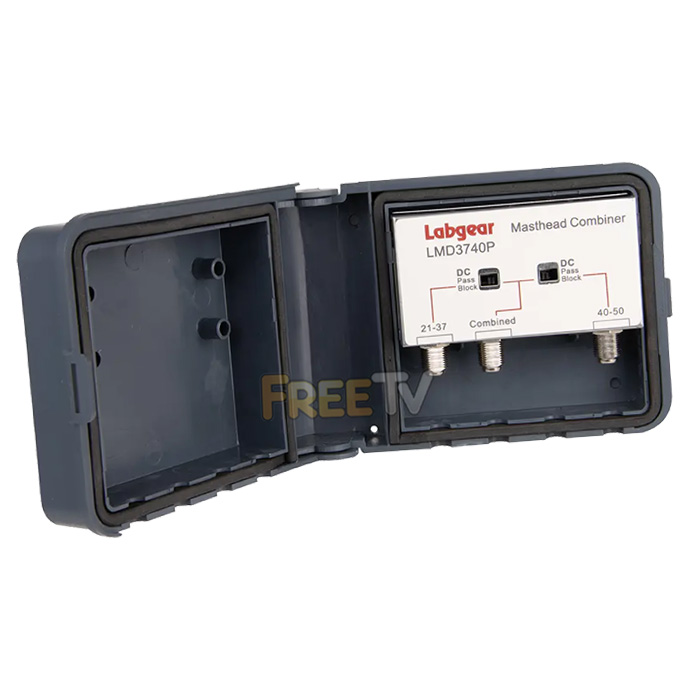

DESCRIPTION of UHF Diplexer
- UHF Diplexer
- VHF/UHF & UHF Masthead Combiner
- Number of Inputs: 2
- Number of Outputs: 1
- Low Pass: VHF + Ch21-37
- Low Pass Typical Loss: 1dB
- High Band-Pass: Ch40-50
- Typical Loss High Band-Pass: 3dB
- Out-of-Band: Above 702MHz
- Typical Loss Out-of-Band: 45dB
- Power Pass: Switchable on both legs
- Comparable Products: Fringe 3740 & TRIAX TFC3537
- CC 8543703000 0.09kg Y
USES of UHF Diplexer
- Used to combine the feed from a UHF aerial and UHF aerial into a single feed e.g. where feed is been taken from a UK and an Irish transmitter
- Combines Input A: 5 – 605MHz and Input B: 623 – 790MHz for a broad spectrum of signals
ADVANTAGES of UHF Diplexer
- Weatherproof casing with heavy-duty cable ties for secure mast or wall mounting
- Prevents interference by excluding frequencies from above or below a certain frequency on each aerial
- Very limited range of alternative products that do this job
- Effectively combines two UHF signals into one especially when aerials are mounted outdoors
- Can be used in conjunction with masthead amplifiers
DISADVANTAGES of UHF Diplexer
- Used only in a limited number of areas in the country normally close to the East coast or the border with Northern Ireland
- Will not solve the problem of when desired frequencies from 2 different transmitters overlap
Note: Video is for old model but is still very applicable to new diplexer
Summary
A diplexer is used to combine the output from 2 UHF aerials into a single satellite cable that can then be distributed and feed into TVs or Digital Terrestrial TV receivers. The Diplexer filters out signal outside the desired range so that:
- Input 1: channel <=37
- Input 2: channel >=40
Tools Needed
- Snips
Equiment needed
- UHF Aerial (qty: 2)
- UHF Diplexer
- Satellite cable
- F connectors (qty: 3)
Procedure
- Take 2 assembled UHF Aerials with satellite cable wired into them
- Terminate each of the cables with an F-connector
- Connected a UHF aerial to both Input 1 and Input 2
- note if using banded UHF aerials make sure they overlap with the input range (see above)
- Install the diplexer and TV aerials on a pole and align to the correct transmitters
- connect the output from the diplexer to a coaxial cable terminated with an f-connector that can be used to distribute the signal around the house
- Connect the output to a MPEG4 TV or Digital Terrestrial TV using a coaxial connector
Note: Transmitter Frequencies May Have Changed
Saorview and Freeview Transmitters
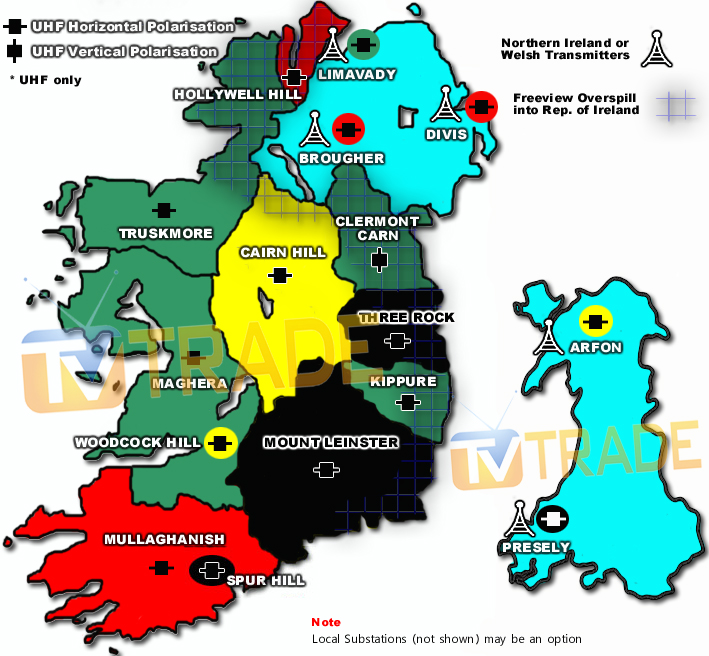
The above map shows all the main Irish Saorview transmitters and also the UK Freeview transmitters which could possibly be picked in regions of Ireland.
Saorview & Freeview Frequencies
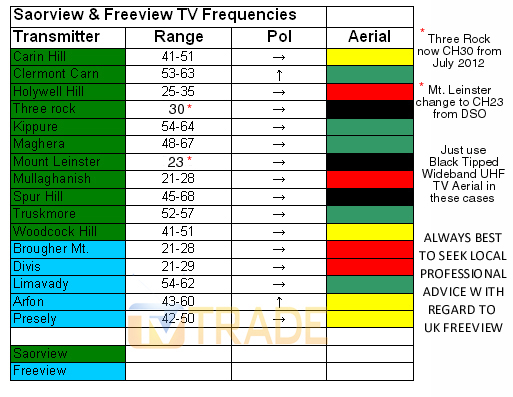
The table above gives the primary transmission channels and the channels range used by each of the transmitter featured in the map above.
View Coastal Transmitter Map [Here]



