


Cart is empty


Save 26%



DESCRIPTION of Sky Magic Eye Installation Kit
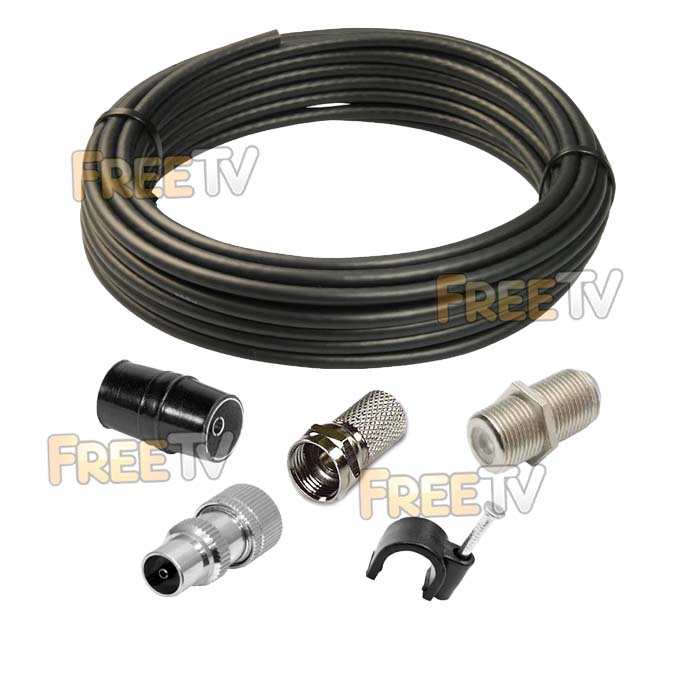
- Sky Magic Eye Installation Kit
- Contents of Kit
- 20m of Satellite Cable (Black)
- 7mm Black Cable Clips (x 20)
- F-Connectors (x 3)
- F-Joiner (x 1)
- Coaxial Connector (x 1)
- Coaxial Joiner (x 1)
- Does NOT Include Sky Magic Eye (Purchase Separately)
Uses of Sky Magic Eye Installation Kit
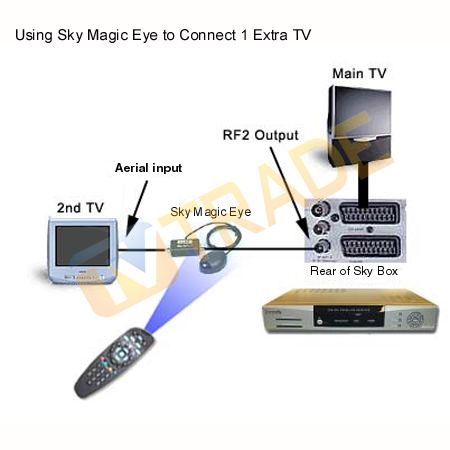
- Kit was created to accompany a Sky magic eye so as to contain everything (cable & connectors) needed to complete the installation of a Sky eye from a Sky Box to a TV in another room.
- When used in conjunction with a Sky magic eye, it will allow you change the channels on your Sky receiver from a second TV
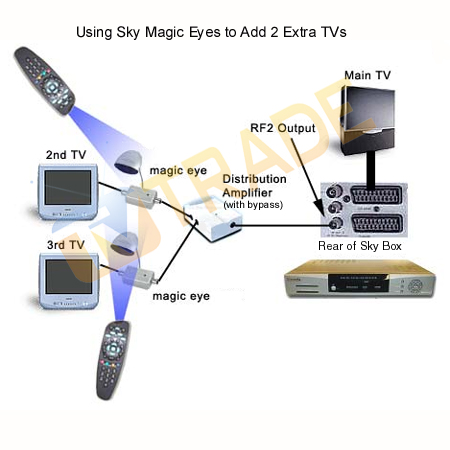
Multi-Room Sky Eye Installs
- If you intend to install Sky magic eyes in a number of additional rooms, customers should choose either a
- 2 or 4 way link amplifier (both distributes & amplifies the Sky signal to up to 4 other rooms)
- Per Extra TV
- Sky Eye (x 1)
- F Connectors (x 3)
- F Joiner (x 1)
- 20m of Satellite Cable (May not be necessary depending on your set up)
Note on 9V RF Out
- If your Sky Box or Satellite Receiver does not have an RF out with a 9V signal you will also need to buy the following item
- Triax Tri-Link Kit (RF modulator with a 9V out signal)
Magic eye TV links are very useful and inexpensive but they are also prone to give a lot of problems. The nub of the issue is that the eye works off a 9V power supply given by a set top box and everything needs to be set up just right if the eye is work properly.
Stage 1: Install and test your magic eye directly off set top box
- Ensure that the box is turned on connected to the TV
- Connect the magic eye to the back to the "RF 2" outlet on the back of the box
- Press the "services" button your remote
- Select "system setup"
- Press ‘0′, ‘1′ & ‘Select" in quick succession
- From the Installer menu select ‘RF Outputs"
- Turn the RF output setting to ‘ON" and exit saving settings
- Also you can adjust the RF channel on which the signal will be broadcast
- If you are combining an aerial input into the RF output this is critical
- If the RF frequency is already being using by a TV channel it will cause interference
- Avoid this by selecting an alternative channel number from 21-69 (68 is the default)
- I generally set 35 as my default but it depends on what your local transmitter is.
- Select ‘RF Outputs"
- Exit out all the way and check to see does the magic eye now work
- The LED on your magic eye should now be lighting
This step has verified that:
- Your magic eye is in working order
- That your box is capable of supplying the necessary 9V signal to power the eye
Stage 2: Install your magic eye in the 2nd room
- Run a satellite cable (connect an existing cable) into the "RF 2" outlet on the back of the satellite box
- This cable will need to be terminated with a coax connector and a coax joiner
- In the attic, join the cable coming from the set top box to the cable feeding the additional TV
using low loss F-connectors (qty 2) and an F joiner (qty1) - For multi-room, use 2 way or 4 way link amplifiers or distribution amplifiers
- Terminate the other end of the cable in the second room with a coax connector
- Push the coax connector into the magic eye
- Push the magic eye into the back of the television
- Tune the TV into the correct frequency ie. Channel 68 (default) which corresponds to 847MHz
- Place the sensor part of the magic eye facing towards the seat which will be used by viewers
- Use your remote to change channels on the remote set top box
- INSTALLATION COMPLETE



