


Cart is empty


Save 22%


Description of Cable Strippers
- DIY Ethernet Cable Strippers
- Suitable For UTP & FTP Ethernet Cables
- Compatibility: CAT5, CAT5e & CAT6 Network Cabling
- Integrated Impact Punch Down Tool
- Material: Plastic & Steel
- Colour: Yellow
- Dimensions: Approx. 9 x 2.5cm
Uses of Cable Strippers
- Use to strip CAT5 & CAT6 network cables to crimp RJ45s
- Can also use with wall plate keystones
Advantages of Cable Strippers
- Easy to use
- Low cost networking tool ideal for DIYers
- Cheaper than buying a professional wire strippers
Disadvantages of Cable Strippers
- While a professional tool would be more long lasting, it would be a lot more expensive
Coming soon...
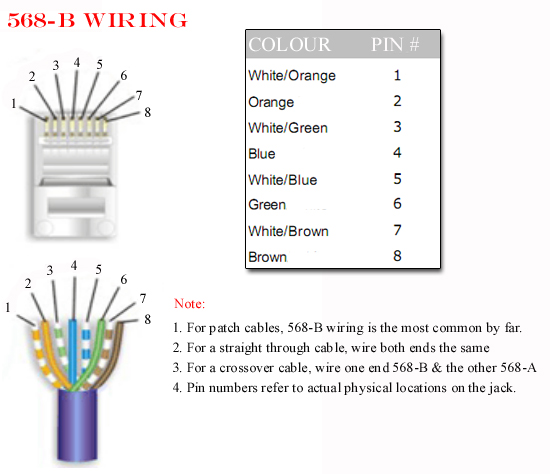
Below is documented the correct wiring format for a CAT5 Cable and detailed instruction for making a CAT5 Cable.
WIRING DIAGRAMS FOR A CAT5 CABLE
Notes
The diagram above is called a CAT5 Type B wiring method which is the one that is almost exclusively used in industry.
TO MAKE A CAT5 CABLE
Equipment needed
- Roll of CAT5 Cable
- RJ45 CRIMPING Tool
- RJ45 Connectors * 2
Steps
- Using a crimping tool remove the outer protective sleeve leaving around 25mm of cable exposed
- Next untwist each of the pairs of cables
- Line up the wires in accordance with the wiring diagram above
- Again using the crimping tool cut the cable leaving about 12-15mm of cable exposed.
- Push the cables into the RJ45 Plug
- Use the crimping tool to crimp the RJ45 Connector on the the cable
- Cut the CAT5 cable to the required lenght
- Repeat the process to put a connector on the far end
NOTES ON CAT5 WIRING
1. 568-A wring
There is an alternate wiring convention for CAT5 cables called 568-A. See diagram below:
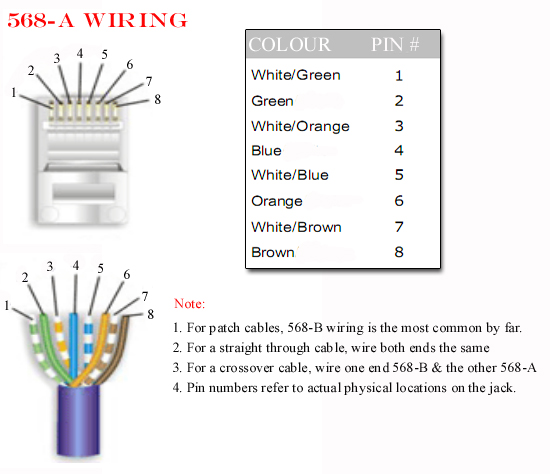
The most common use of this convention would be use a Type A & and a Type B connector to make a cross over cable.
2. Types of CAT5 Cable
- The most commonly used cat5 cable is UTP (Unshielded Twisted Pair) cable. This is suitable for homes and offices
- A more expensive option is to use FTP (Foil shielded Twisted Pair) cable
- Which gives greater interference protection when running next to power cables
No posts found



