


Cart is empty


Save 20%
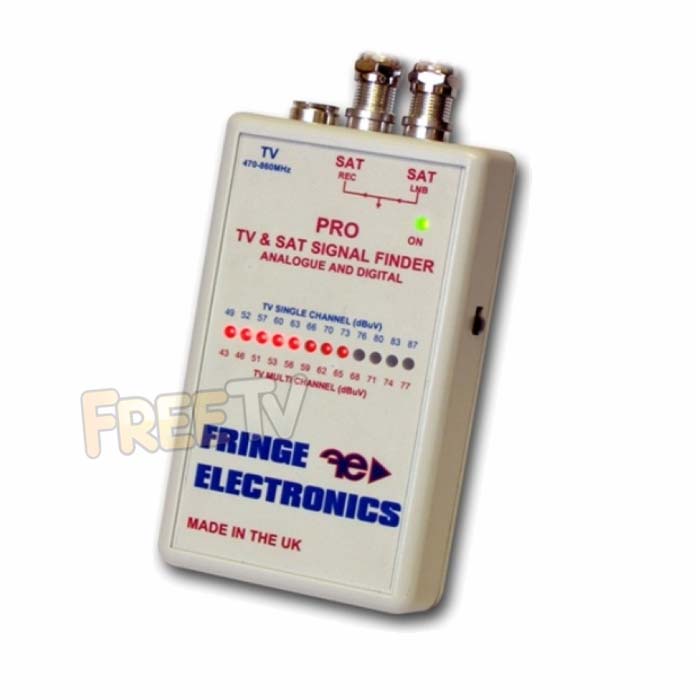

DESCRIPTION of UHF & Satellite Meter
- Dual Purpose Satellite & Terrestrial UHF Meter
- Manufacturer: Fringe
- Contents
- Meter For UHF TV Aerial & Satellite Dish Alignment
- 9V Battery (Used When Aligning UHF Aerials)
- Colour: White
- Inputs:
- UHF IN
- Satellite Dish
- Satellite Receiver IN
- CC 85291095 0.11kg Y
USES of UHF & Satellite Meter
- For aligning satellite dish to pick up a satellite signal
- for the Astra 2 (BBC, ITV), Hotbird (Polish), Astra 1 (German, French)
- For aligning UHF TV aerials to pick up broadcasts from terrestrial transmitters
- For the Irish Saorview channels (RTE1, 2, TV3, TG4 etc..)
- For Freeview HD in Northern Ireland & UK
ADVANTAGES of UHF & Satellite Meter
- Inexpensive and handy tool for aligning a satellite dish and UHF TV aerials
- Reduces the need to have a second person when aligning the dish or aerial
DISADVANTAGES of & and Satellite Meter
- Will not tell you which satellite or TV transmitter you are receiving signal from
- Takes far more time to align than with a professional satellite meter
- Will not work with wideband LNBs
PROCEDURE for Using FRINGE UHF Meter
- Connect the cable coming from the UHF aerial to the "Coax connector" input on the Fringe meter.
- Ensure that the meter in turned on.
- Normally about 2 LEDs will light up if the aerial if it is picking up a low signal
- Slowly rotate the UHF aerial with the aim of increasing the number of LEDs lighting.
- When the number of LEDs starts to decrease again you know you have passed the peak and should start rotating the aerial in the other direction.
- Remove the Fringe meter and feed the cable directly to the TV
- Test signal on TV by tuning channel to the the correct frequency for your local TV transmitter - see Analogue Aerial Selection Guide
PROCEDURE for Using FRINGE Satellite Meter
- Connect the meter lead from the Satellite LNB to the "To LNB" Connection on the satellite finder
- Connect the satellite cable coming from the satellite receiver toh teh "To Rec" input on the satellite finder
- Make sure your satellite receiver is on. The satellite Meter LED should be on (powered by the satellite receiver) and give a reading of around 4 LEDs
- Set the satellite dish to roughly the correct angle and direction e.g. Astra 2 satellite is found at 21 degrees elevation and 141 degrees on the compass (slight variation depending on what part of Ireland you are in).
- Set the satellite finder"s scale to reading to about 5 by adjusting the control level found on the face of the satellite dish (clockwise turning with increase the reading)
- Peak the signal by slowly turning the elevation and direction of the dish.
- Verify on the satellite receiver that you have tuned the satellite dish to the correct satellite by switching to / tuning in a channel e.g. BBC 1 on the Astra 2 satellite.
- Remove the meter lead and satellite finder and connect the LNB to the satellite cable coming from your dish.



