


Cart is empty


Save 27%
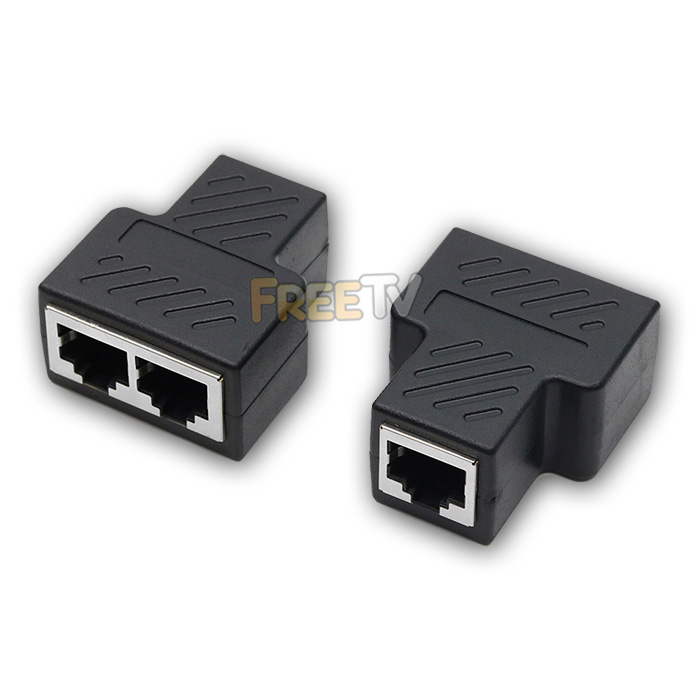



DESCRIPTION of RJ45 Splitter
- 2 Way Passive RJ45 Splitter
- Allows You Share a Single CAT5/CAT5e Run With 2 Outputs Simultaneously
- Note: Only Works With CAT5 and CAT5e (They Only Use 2 Pairs)
- Will Not Work with CAT6 (Uses All 4 Pairs)
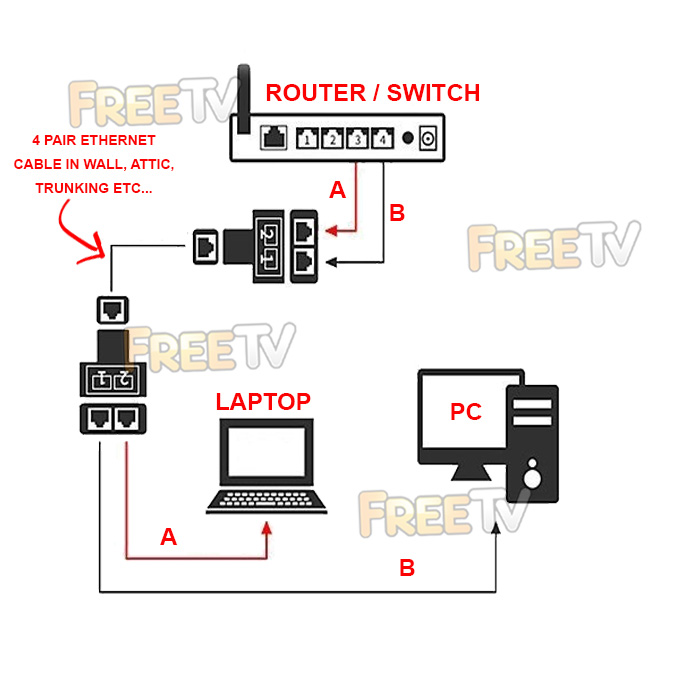
- Easy Setup, Just Plug & Play (Please See Additional Images For Setup)
- 2 Cables MUST Come Directly From Router / Switch Into Splitter A
- Single Ethernet Cable in Wall Must Have 8 Cores (4 Pairs; This is Normal & Can Use CAT5 or CAT6 Here)
- 2 Cables MUST Come Out of Splitter B Running to Device #1 & #2
- Contents: Pack of 2 RJ45 Splitters (Must Use as Pair)
- CC 85389000 18g Y
USES of RJ45 Splitter
- Used with CAT5 / CAT5e cables to build office or home network
- Compatible with both 10Mbps & 100Mbps networks
- Used where you have only a single cable running in attic, trunking or walls but need a second output at far end of run
- Traditionally you could use a network switch for this, but it is more expensive and requires a power source on the far end
ADVANTAGES of RJ45 Splitter
- Is compatible with 10/100/1000Mbps networks (Will work at max. 100Mbps)
- Can really get you out of a hole if you are stuck for an extra wired ethernet connection
- Passive RJ45 splitter so requires no additional network switch or external power source
DISADVANTAGES of RJ45 Splitter
- 1 additional ethernet connection may not be enough but when you just need the one extra, this is ideal
- Must be used in pairs. If used singly, you cannot have simultaneous usage
Coming soon...
No posts found



