


Cart is empty


Save 20%
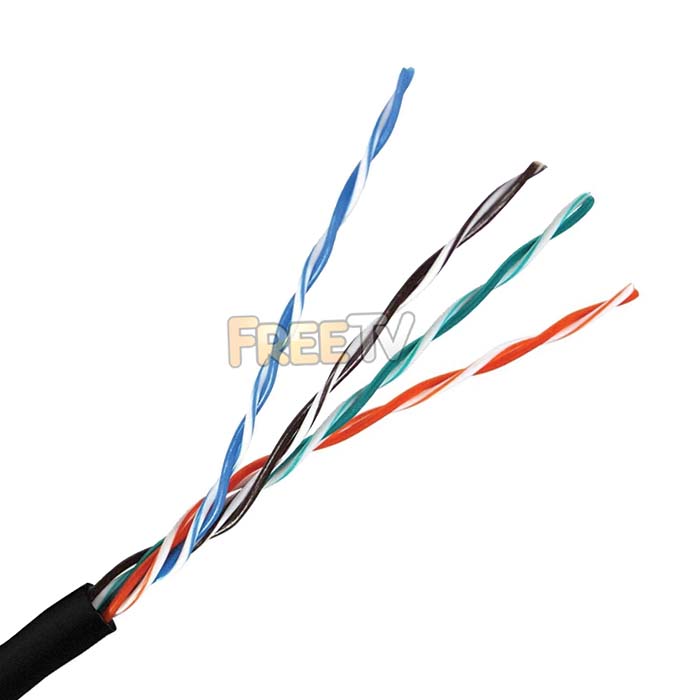

DESCRIPTION of Outdoor Cat5e UTP Ethernet Cable
- Outdoor CAT5e UTP 100MHz Ethernet Cable
- UV Treated Ethernet Cable
- CCA: Copper Clad Aluminium (Without Magnesium)
- No Magnesium Improves Overall Conductivity of Cable
- But Cores are Softer - It's a Compromise Between Speed & Strength
- Implications: The Cable Performs Better But Slightly Harder to Work With
- Our Own Tests
- We Have Run HD Picture Over a 305m Length Using a Single Pair With Perfect Picture
- We Have Operated PTZ Telemetry Control Over 305m, Again Worked Perfectly on Single Pair

- Colour: Black
- Pairs: 4 Sets of Twisted Pair
- UTP
- Dimensions
- Outer Cable Diameter: 5.35mm
- Outer Core Cable Diameter: 0.85mm (Inner 0.49mm)
- High Quality CAT5 Cable
- UV Resistant Sheath
- Water Resistant Sheath
- Length: 305m
- Outer Diameter: 6mm
- Connector Type:
- RJ45 8 Pin Connector
- Use an RJ45 Crimping Tool
- CC 8544492000 6.5kg N
USES of Outdoor CAT5e UTP Ethernet Cable
For a wide range of purposes when it is necessary to run CAT5 outdoors e.g.:
- Wireless broadband antenna being run to a router
- Connecting a second building to a LAN network
- Running cables to outdoor IP Cameras
ADVANTAGES of Outdoor CAT5e UTP Ethernet Cable
- Comes with a protective PE Sheath which is resistant to water and UV rays
- Ideal for outdoor use
- Can be used over very long runs
- Ideal for almost all outdoor applications
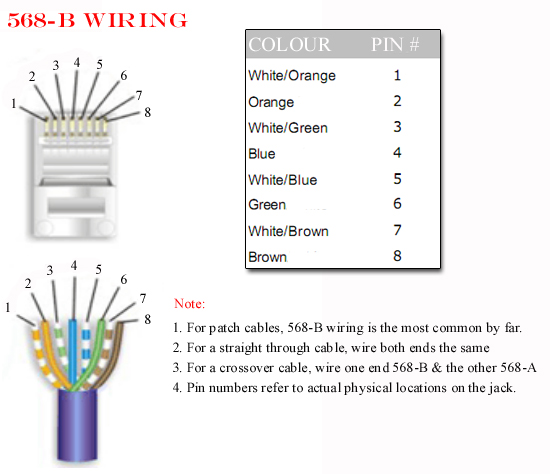
Below is documented the correct wiring format for a CAT5 Cable and detailed instruction for making a CAT5 Cable.
WIRING DIAGRAMS FOR A CAT5 CABLE
Notes
The diagram above is called a CAT5 Type B wiring method which is the one that is almost exclusively used in industry.
TO MAKE A CAT5 CABLE
Equipment needed
- Roll of CAT5 Cable
- RJ45 CRIMPING Tool
- RJ45 Connectors * 2
Steps
- Using a crimping tool remove the outer protective sleeve leaving around 25mm of cable exposed
- Next untwist each of the pairs of cables
- Line up the wires in accordance with the wiring diagram above
- Again using the crimping tool cut the cable leaving about 12-15mm of cable exposed.
- Push the cables into the RJ45 Plug
- Use the crimping tool to crimp the RJ45 Connector on the the cable
- Cut the CAT5 cable to the required lenght
- Repeat the process to put a connector on the far end
NOTES ON CAT5 WIRING
1. 568-A wring
There is an alternate wiring convention for CAT5 cables called 568-A. See diagram below:
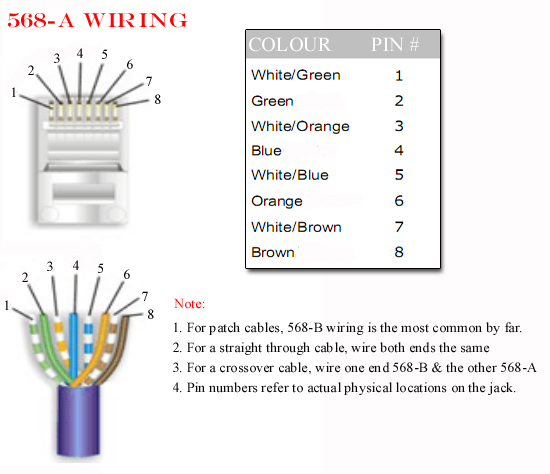
The most common use of this convention would be use a Type A & and a Type B connector to make a cross over cable.
2. Types of CAT5 Cable
- The most commonly used cat5 cable is UTP (Unshielded Twisted Pair) cable. This is suitable for homes and offices
- A more expensive option is to use FTP (Foil shielded Twisted Pair) cable
- Which gives greater interference protection when running next to power cables
Notes on Connectors
- The RJ stands for "Registered Jack"
- The RJ11 comes with 4 pin slots
- Only the 2 middle pins are needed
- It is used for dial up internet or voice but not broadband
- It is used with telephone cables
- If the RJ connector has copper pins in all 4 slots it is actually an RJ14 but can be used as if it was an RJ11
- The other commonly used RJ plug is the RJ45
- It is used with LAN networks, ethernet ports etc
- It has 8 pins
- It is used with CAT5 Cable



