


Cart is empty


Save 22%
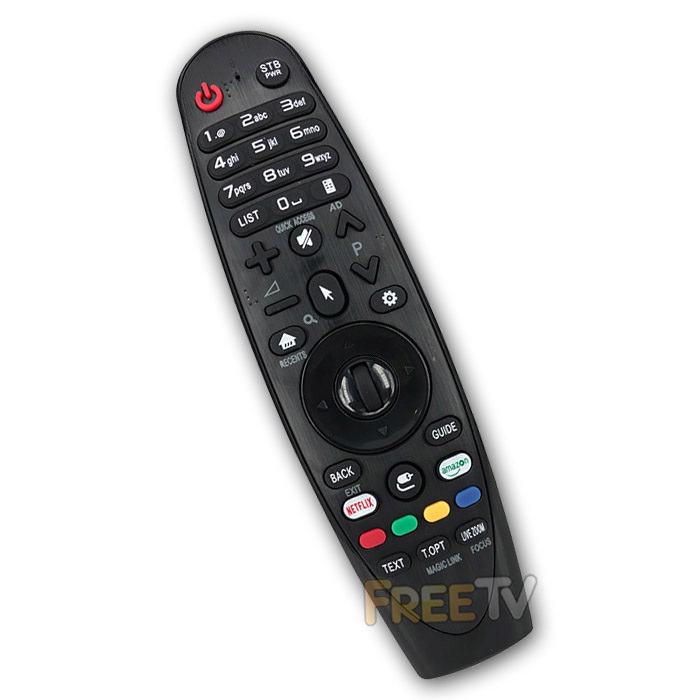

DESCRIPTION of LG AN-MR400P Magic Remote Control
- Replacement LG AN-MR400P Magic Remote Control
- Sometimes Written as LG MR400P Magic Remote Control
- No Need to Program With TV Codes
- Just Insert Batteries, Insert NEW Dongle in USB Port of TV & Pair Remote With Television
- Colour: Black
- Range: 8-10m
- Batteries Not Included (Takes 2x AA)
- Not an Original LG Magic Remote Control
- Note: This Compatible Remote Does Not Have Voice Recognition Feature
Pairing Your Remote Control
- Plug the USB dongle into TV’s USB port. A connection image will appear on the TV screen
- Press the wheel down (OK button) for about 3 seconds, the LED will light up on the remote
- Point the remote towards the USB dongle. The LED will flash 3 times and then goes off
- Pairing is now completed and the pointer should appear on the screen
Notes About Pointer / Cursor on TV Screen
- To display the pointer on the screen, press the 'Pointer Button'
- You can move the remote to the right and left to control the direction
- If you press a 'Direction Key' (Up/Down/Left/Right) while the pointer is being used, the pointer will disappear from the TV screen
COMPATIBILITY of LG AN-MR400P Magic Remote Control
- The list includes but is not limited to...
LG 47LM860V Remote Control
LG 55LM860V Remote Control
LG 47LM960V Remote Control
LG 55LM960V Remote Control
LG 84LM960V Remote Control



