


Cart is empty


Save 22%
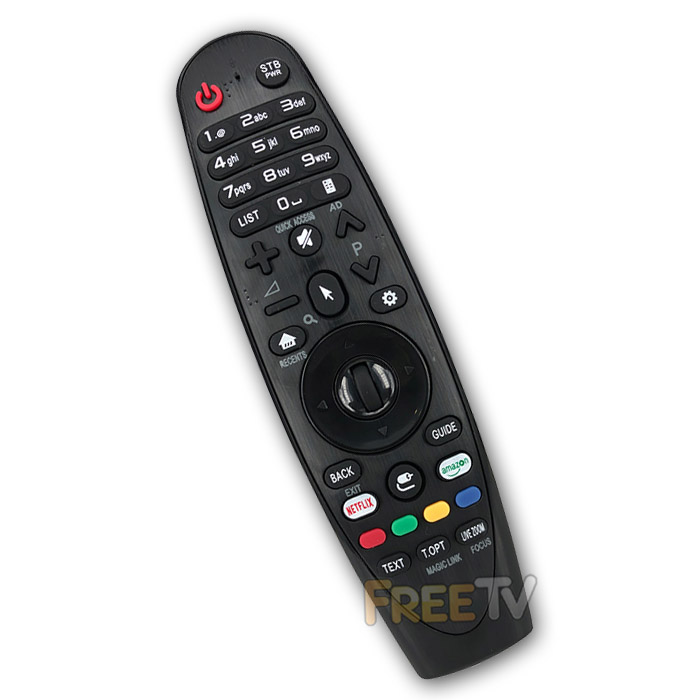

DESCRIPTION of LG AN-MR400G Magic Remote Control
- Replacement LG AN-MR400G Magic Remote Control
- Sometimes Written as LG MR400G Magic Remote Control
- No Need to Program With TV Codes
- Just Insert Batteries, Insert NEW Dongle in USB Port of TV & Pair Remote With Television
- Colour: Black
- Range: 8-10m
- Batteries Not Included (Takes 2x AA)
- Not an Original LG Magic Remote Control
- Note: This Compatible Remote Does Not Have Voice Recognition Feature
Pairing Your Remote Control
- Plug the USB dongle into TV’s USB port. A connection image will appear on the TV screen
- Press the wheel down (OK button) for about 3 seconds, the LED will light up on the remote
- Point the remote towards the USB dongle. The LED will flash 3 times and then goes off
- Pairing is now completed and the pointer should appear on the screen
Notes About Pointer / Cursor on TV Screen
- To display the pointer on the screen, press the 'Pointer Button'
- You can move the remote to the right and left to control the direction
- If you press a 'Direction Key' (Up/Down/Left/Right) while the pointer is being used, the pointer will disappear from the TV screen
COMPATIBILITY of LG AN-MR400G Magic Remote Control
- The list includes but is not limited to...
LG 60PH670V Remote Control
LG 50PH670V Remote Control
LG 47LA667V Remote Control
LG 42LA667V Remote Control
LG 47LA710V Remote Control
LG 55LA710V Remote Control
LG 32LN655V Remote Control
LG 42LN655V Remote Control
LG 27MT93V Remote Control
LG 50PH670V Remote Control
LG 60PH670V Remote Control
LG XXPH672V Remote Control



