


Cart is empty


Save 26%
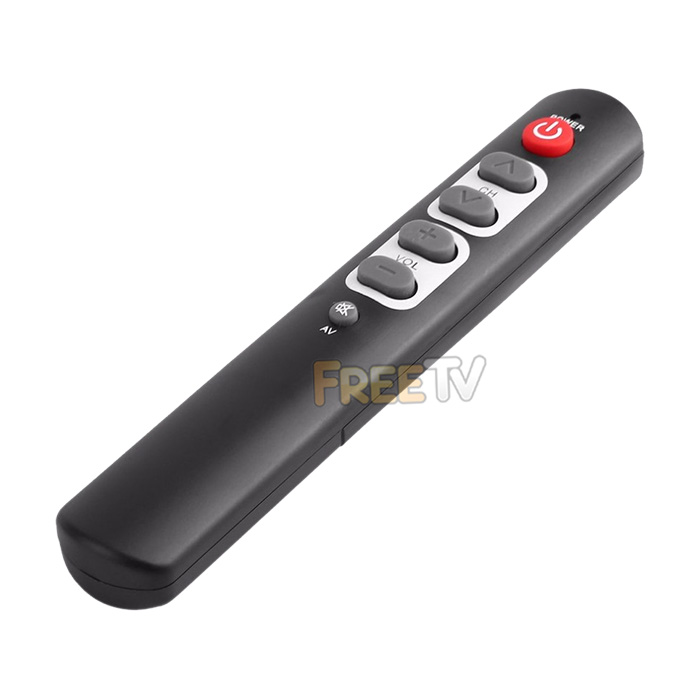

DESCRIPTION of Large Button Remote Control
- Large Button Remote Control For Elderly People
- AKA Senior TV Remote Control
- Important Notes
- You MUST Have Original Working Remote
- The Large Button Remote Control is a Learning Remote
- It Must Learn From Original Remote Control
- Universal Remote Specifically For Old or Partially Sighted Folks
- Large Power, Channel Up/Down & Volume Up/Down Buttons
- Colour: Black
- Batteries (2x AAA): Not Included
- Brand Compatibility
- Samsung, Philips, Sony, LG, Panasonic, Toshiba, Sharp, Hisense, Telefunken, Thomson, Grunding
- Digihome, Walker, Finlux, Luxor, Nordmende, iDeal, Alba, Technika, Tevion, AKAI, Akura, Beko
- Blaupunkt, Bush, Ferguson, JVC, Medion, Sanyo, Techwood, Sky, Celcus, Hitachi & Many More
- Basically Works With Any Remote That Can Transmit an IR Signal to Learn From
How to Teach Your Large Button Remote Control
- (1) Place your large button remote and original remote control face up & head to head so IR emitters are facing each other
- (2) Press the power button & channel up button on the large button remote at the same time until the LED starts blinking continuously
- Place remote no more that 4 inches apart
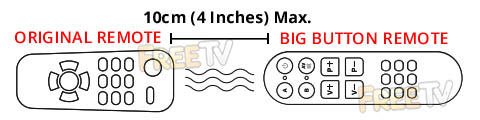
- (3) Press the button on the large button remote you want to programme. (i.e. Power button) until the LED is lit constantly
- (4) Press the button on the original remote and hold for two to three seconds until the learning remote flashes three times quickly and then starts blinking steadily
- (5) Repeat step 3 & 4 for other commands such as channel up / down, volume up / down & mute
- (6) When finished programming the remote, press the power button and the channel up button on the learning remote together until the led is not lit any longer
- (7) If you make any errors, you can repeat these steps to override any programming in the large button remote control
USES of Large Button Remote Control
- The large buttons & hugely reduced functionality on our big button remote control are ideal for...
- Senior citizens
- Those who are partially sighted
- Young children
- Those with manual dexterity issues
- May also be useful for patients with Parkinson's or other conditions with hand tremors
- Suitable for anyone who just wants a simple & easy to use remote control with large buttons
ADVANTAGES of Large Button Remote Control
- Once you teach the Large button remote control, it completely simplifies your remote control experience
- The larger buttons are easier to read
- It only takes a few minutes to teach and the process is very simple
- The remote retains it's memory while changing batteries
- This is an ideal remote control for seniors
DISADVANTAGES of Large Button Remote Control
- It is a learning remote so you need to teach it from your original remote control
- You MUST have a working original remote control
- It only takes a few minutes but perhaps folks might prefer an out of the box solution
- While our Large button remote control is ideal for TVs, it can work with pretty much any AV equipment
- If using with other AV equipment, you should note that obviously there will be no play, fast forward, rewind functions etc..
- It can take more than one attempt to learn a button's functionality
- This will be most likely to do with the distance and angle you are holding the two remotes apart
- From our own in-house testing, once you find the optimal angle and distance, it will only take a couple of minutes to fully program up the remote



