


Cart is empty


Save 19%
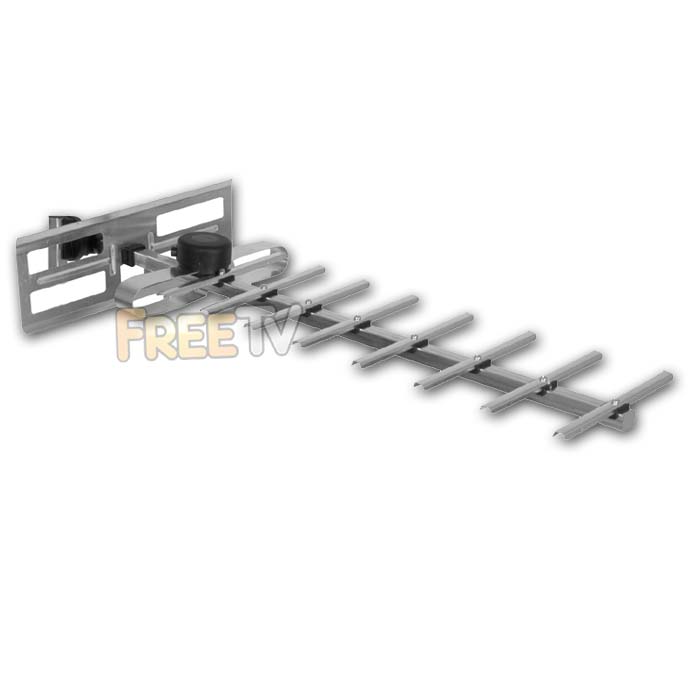

DESCRIPTION of UHF TV Aerial (Group K - Grey)
- 10 Element UHF Aerial
- Saorview Digital TV: Yes
- Tip Colour: Grey
- Gain: 7 - 10 dB
- Colour: Silver
- Contains Printed Circuit board (PCB) and Balun
- Dimensions(HxWxL): 30 x 30 x 90 cm
- Band: Group K
- Channel: 21-48
- Frequency: 470-694 Mhz
- Manufacturer: Blakes
- CC 8529103900 0.42kg N
Consists of
- 10 Element contract TV aerial
- Deflector Plate
- Mounting bracket
- Grid Deflector acts to block unwanted signals from secondary TV transmitters
USES of UHF TV Aerial (Group K - Grey)
- A Grouped UHF TV aerial which covers the lower half of the UHF and is ideally suited to certain TV Transmitters
- If correctly selected for a transmitter it will give results:
- as good as a Grid TV aerial
- better than from a Wide band contract TV aerial
- Can be used with a diplexer and FM aerial to pick up UHF / FM broadcasts
ADVANTAGES of UHF TV Aerial (Group K - Grey)
- Will give excellent results on Group K UHF transmissions
- Very low cost compared to a grid TV aerial
- Can give good results even in very poor reception areas (if correct group).
- Takes up 30cm of pole space compared to 80cm for a Grid TV aerial - an issue when space is tight on your aerial pole
DISADVANTAGES of UHF TV Aerial (Group K - Grey)
- Will perform extremely poorly if used on the wrong UHF Group
- This makes it inflexible if you are unsure which transmitter to use (see transmitter tab for guide)
Introduction to Aerial Assembly
The various different types of aerials stocked by Tvtrade.ie can be broken into 3 basic categories:
- UHF High Gain Grid Aerials
- UHF Contract Aerials
- Wideband
- Grp A
- Grp B
- Grp CD
- Grp K
- UHF Medium Gain Aerials
How to assemble a UHF Aerial is outlined below.
Tvtrade.ie stock 5 different types of this aerial - Group A, B, CD, K and wideband. They are all assembled in exactly the same manner.
Equipment needed
- 10 Element contract UHF Aerial - Consists of: Aerial, Backplate & Bracket
- Length of RG6 Satellite Cable
Tools needed
- Snips
- Small flat head screwdriver
Steps to Install
- Using a snips pare back 2cm from the end of the RG6 cable and wrap the earth cable around the base of the cable leaving at least 1cm of the central core cable exposed.
- Pull the plastic cover off the top of the aerial assembly
- Slot the end of the RG6 cable through the base of the aerial assembly and into the fixing nuts for the earth and core wires
- Use the screwdriver to tighten the screws so that both the earth and core wires are securely screwed in place and are not touching each other
- Click the plastic cover back on
- Slot the faceplate into the groove at the back of the aerial so that the curved surface of the deflector faceplate is facing towards the elements of the aerial
- Slot the pole bracket onto the back section of the aerial - it can be used to mount aerial vertically or horizonitally
- ASSEMBLY IS NOW COMPLETE !
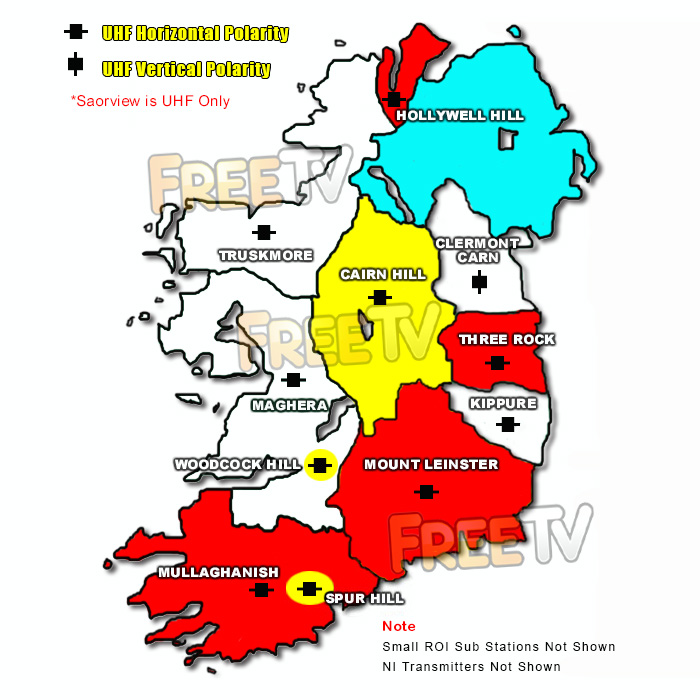
See map below for main Saorview transmitters in Ireland
The map shows the main Saorview transmitters, their coverage and the colour code (tip) of the best UHF aerial to use in that area
What TV Channels Can I Receive?
- Currently, it is possible to receive 10 Irish TV channels

What Radio Stations Can I Receive?
- Currently, it is also possible to receive some Irish digital radio stations

Additional Info
- Receivers with a DVB-T tuner, can receive the above Saorview channels
- Receivers that have a DVB-T2 tuner, can not only pick up the Saorview channels but also if along the border with Northern Ireland, can also pick up UK Freeview HD channels*
*Location dependent



