


Cart is empty


Save 25%
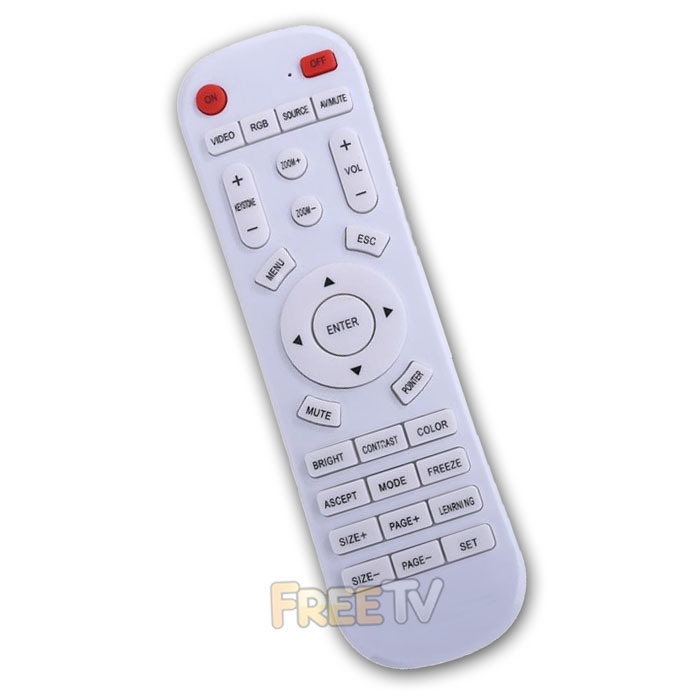

DESCRIPTION of FUJITSU Projector Remote Control
- FUJITSU Projector Remote Control
- Programmable Universal FUJITSU Projector Remote Control
- 2 Button Quick Setup (Press SET Button + Desired Brand)
- See Instructions Below & Under Downloads Tab For Alternative Brand Codes
- Compatible Remote Control
- Compatibility: Full / Partial
- All Main Functions Guaranteed to Work at a Minimum
- Colour: White
- Batteries Not Included (Requires 2x AAA Batteries)
How to Program Remote
Step 1: Put remote in programming mode
- Press “SET” and “MUTE” together
- When the remote flashes 3 times, release the buttons
- It is now in programming mode
Step 2: Programme remote for your projector
- Look on list (rear of remote) for your brand
- For FUJITSU press “SET” & “VIDEO”
- Again light will flash
Step 3: Test has it worked
- Press the ‘MENU’ button on the remote control
- Working -> If the menu comes up, your remote has been set up successfully
- Not working -> If menu does not come up, repeat step 2 and 3 for other options (if any) on the list for your brand
Compatibility of FUJITSU Projector Remote Control
Some Fujitsu projectors that this remote should work with include...
Fujitsu LPF-1003 Projector Remote Control
Fujitsu LPF-3200 Projector Remote Control
Fujitsu LPF-4200 Projector Remote Control
Fujitsu LPF-4700 Projector Remote Control
Fujitsu LPF-4800 Projector Remote Control
Fujitsu LPF-5200 Projector Remote Control
Fujitsu LPF-6200 Projector Remote Control
Fujitsu LPF-7200 Projector Remote Control
Fujitsu LPF-7700 Projector Remote Control
Fujitsu LPF-8200 Projector Remote Control
Fujitsu LPF-B211 Projector Remote Control
Fujitsu LPF-D711 Projector Remote Control
Coming soon...
No posts found



